 Daan Perry
TryHackMe - Volt Typhoon
Daan Perry - 2025-07-23
Volt Typhoon Intrusion
Find the lab here https://tryhackme.com/room/volttyphoon
Let me start of with saying, no answers will be shared in this post. This post will only describe my process and how I found the answers for this lab. This post is meant for those who either got stuck or are curious about how other people solved this lab. I encourage you to try this lab on your own first and only use a walkthrough when you have been stuck for an hour. I will be sharing the mistakes I made, and how I got out of being stuck in hopes that it may help others learn too.
The scenario
The SOC has detected suspicious activity indicative of an advanced persistent threat (APT) group known as Volt Typhoon, notorious for targeting high-value organizations. Assume the role of a security analyst and investigate the intrusion by retracing the attacker's steps.
You have been provided with various log types from a two-week time frame during which the suspected attack occurred. Your ability to research the suspected APT and understand how they maneuver through targeted networks will prove to be just as important as your Splunk skills.
You have been provided with various log types from a two-week time frame during which the suspected attack occurred. Your ability to research the suspected APT and understand how they maneuver through targeted networks will prove to be just as important as your Splunk skills.
Walkthrough
After the lab has started we need to connect to Splunk, this can either be done from your own machine through OpenVPN or you can use the AttackBox. The easiest way to get started with Splunk is to either use
index=*
or use the "Data Summary" button and click the host or source you want to investigate.Make sure to select "All Time" as your timeframe unless you need to be in a specific timeframe. Most labs use data from a year if not more ago.
Since we're still unfamiliar with the data set it is a good idea to take a quick look at the available sources and interesting fields. This lab does a good job explaining the common adversarial tactics & techniques (The ATT in MITRE ATT&CK) that Volt Typhoon uses. A good source to keep handy while doing this lab is the Volt Typhoon Techniques Used page https://attack.mitre.org/groups/G1017/. Read the questions carefully before jumping into the data. Recognizing these Indicators of Compromise (IoC) may be valuable in later labs or career.
index=volthunter All Time
Initial Access
Question 1:
Comb through the ADSelfService Plus logs to begin retracing the attacker’s steps. At what time (ISO 8601 format) was Dean's password changed and their account taken over by the attacker?
Comb through the ADSelfService Plus logs to begin retracing the attacker’s steps. At what time (ISO 8601 format) was Dean's password changed and their account taken over by the attacker?
We've been given a pretty good hint here, we know that we need to use the ADSelfService Logs. For a
username
that likely includes "Dean" and action_name
that changes the password. All of these can be added one by one by either typing them in the query bar or simply clicking on them in the Interesting Fields
.host=volthunter source="/home/volthunter/logfiles/adss.log" username="dean-admin" action_name="Password Change"

Question 2:
Shortly after Dean's account was compromised, the attacker created a new administrator account. What is the name of the new account that was created?
Shortly after Dean's account was compromised, the attacker created a new administrator account. What is the name of the new account that was created?
All we have to do now is change the action we're looking for an remove the
username
filter. If we remove both filters we can click on the action_name
filter in the Interesting Fields
column (or Selected
if we added it) to see the top 10 values. Luckily there are only 9 actions and only one action that could reasonably indicate account creation. Clicking on Enrollment will add this as a filter and we find our newly created users.Another option, but perhaps less reliable is to check for the accounts with the least amount of logs. However this would only work if the account was barely used or the logs we have are from close to when the unauthorized account was created.
.
.
host=volthunter source="/home/volthunter/logfiles/adss.log"| rare limit=20 username
Newly created users
Execution
Question 3:
In an information gathering attempt, what command does the attacker run to find information about local drives on server01 & server02?
In an information gathering attempt, what command does the attacker run to find information about local drives on server01 & server02?
Our unauthorized user is now starting to execute commands. The lab mentions that our unauthorized user is likely to "leverage WMIC" and to use "living off the land" binaries (LOLBins). Our first step is to change our source to
source="/home/volthunter/logfiles/wmicupdated0221.log"
We know that we're looking for executed commands, and we can see a command field in our Interesting Fields column. Let's use this knowledge to search for the
server01
string in the command
field with wildcards.host=volthunter source="/home/volthunter/logfiles/wmicupdated0221.log" command=*server01*
Find a specific command
And again a quick check could be to use the
Interesting Fields
column to check for rare values on the command field.Find rare commands
Question 4:
The attacker uses ntdsutil to create a copy of the AD database. After moving the file to a web server, the attacker compresses the database. What password does the attacker set on the archive?
The attacker uses ntdsutil to create a copy of the AD database. After moving the file to a web server, the attacker compresses the database. What password does the attacker set on the archive?
This answer can be found in the rare commands list as well. However for the sake of learning let us follow the proper route to the answer. First step is to find the full command the unauthorized user used to create the copy. Just like before we can use wildcards in the search string
host=volthunter source="/home/volthunter/logfiles/wmicupdated0221.log" command=*ntdsutil*
From the results of that query we learn that the unauthorized user created a temp.dit file in the root folder of the webserver-01. If we search for this specific file we find that the user executed two more commands on this file one of which was using a password.
Password found
Evasion
Question 5:
In an attempt to begin covering their tracks, the attackers remove evidence of the compromise. They first start by wiping RDP records. What PowerShell cmdlet does the attacker use to remove the “Most Recently Used” record?
In an attempt to begin covering their tracks, the attackers remove evidence of the compromise. They first start by wiping RDP records. What PowerShell cmdlet does the attacker use to remove the “Most Recently Used” record?
While the hint for this question gives us the MITRE ATT&CK tactic, it does not actually give us the command. What we can do instead is use the information found and search for methods to delete the Remote Desktop Connection logs in powershell.
Find remove commands
Question 6:
The APT continues to cover their tracks by renaming and changing the extension of the previously created archive. What is the file name (with extension) created by the attackers?
The APT continues to cover their tracks by renaming and changing the extension of the previously created archive. What is the file name (with extension) created by the attackers?
The perfect example of why logging everything you find is important. If we did we would know that the created archive was called cisco-up.7z. We can double check this by going back to Question 4 and checking the attached screenshot.
Now if we run the same search as in Question 4 but with the new filename we can see that the unauthorized user change the filename a little over 2 hours after the creation of the file.
host=volthunter source="/home/volthunter/logfiles/wmicupdated0221.log" command=*cisco-up.7z*
Renamed archive
Question 7:
Under what regedit path does the attacker check for evidence of a virtualized environment?
Under what regedit path does the attacker check for evidence of a virtualized environment?
If we check MITRE ATT&CK T1497 for Volt Typhoon we learn that "Volt Typhoon has run system checks to determine if they were operating in a virtualized environment". The questions hints at regedit path. This was another good learning moment for me, I used this as an opportunity to learn more about Registry Paths and Registry Values. Which led me to use a query using
HKEY_LOCAL
.Looking at the results I realized this could have been done much simpler by searching for
*Virtual*
.Virtual
Credential Access
Question 8:
Using reg query, Volt Typhoon hunts for opportunities to find useful credentials. What three pieces of software do they investigate? Answer Format: Alphabetical order separated by a comma and space.
Using reg query, Volt Typhoon hunts for opportunities to find useful credentials. What three pieces of software do they investigate? Answer Format: Alphabetical order separated by a comma and space.
We know that the unauthorized user is using reg (T1012) to query for software. We can start our search by looking for the reg command in the CommandLine Field.
.
.
host=volthunter source="/home/volthunter/logfiles/pshell.log" CommandLine=reg
Lucky for us this returns only 8 events in total, all of which are software that could be user to connect with a host and, if present, likely contain hashed credentials the unauthorized user may be able to abuse. (T1555)
Question 9:
What is the full decoded command the attacker uses to download and run mimikatz?
What is the full decoded command the attacker uses to download and run mimikatz?
The question already hint at this, but it is unlikely they used the filename mimikatz in their request as this should have been instantly flagged. This means we're looking for a command that is encoded, most likely Base64.
Always check for low hanging fruit first, if we check the rare commands ran in PowerShell we find a suspicious -exec command that was only ran once. If we check this specific event we can see that the command was used with a long Base64 encoded string. Decoding this string with something like CyberChef will give us the answer.
Base64 string found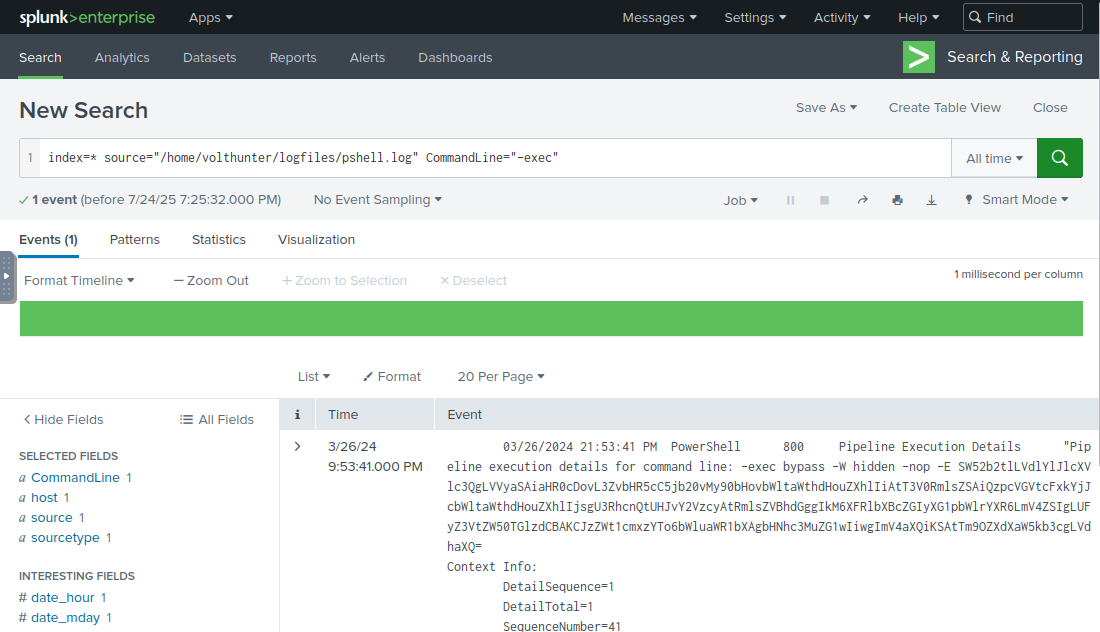
Discovery & Lateral Movement
Question 10:
The attacker uses wevtutil, a log retrieval tool, to enumerate Windows logs. What event IDs does the attacker search for? Answer Format: Increasing order separated by a space.
The attacker uses wevtutil, a log retrieval tool, to enumerate Windows logs. What event IDs does the attacker search for? Answer Format: Increasing order separated by a space.
We can either search for wevtutil in the powershell logs or EventID. Since we know they were checking Windows event ids, a query on EventID will give us a more useful list of events.
host=volthunter source="/home/volthunter/logfiles/pshell.log" EventID
Question 11:
Moving laterally to server-02, the attacker copies over the original web shell. What is the name of the new web shell that was created?
Moving laterally to server-02, the attacker copies over the original web shell. What is the name of the new web shell that was created?
Modifying the previous query slightly will get us straight to the answer for this question.
host=volthunter source="/home/volthunter/logfiles/pshell.log" server-02
Some extra information that this log will teach us is how important it is to check the inetpub folder when IIS is enabled on a system. As Volt Typhoon shows it is also a very useful folder for Pen Testing.
Collection
Question 12:
The attacker is able to locate some valuable financial information during the collection phase. What three files does Volt Typhoon make copies of using PowerShell? Answer Format: Increasing order separated by a space.
The attacker is able to locate some valuable financial information during the collection phase. What three files does Volt Typhoon make copies of using PowerShell? Answer Format: Increasing order separated by a space.
If we remember our PowerShell commands we can search for any command that is using the Copy-Item. Or since we know the unauthorized user copied a file in the previous question we can check the command used there. Search for this command will return a few events but only three of them are the likely financial information candidates.
host=volthunter source="/home/volthunter/logfiles/pshell.log" CommandLine=Copy-Item
C2 & Cleanup
Question 13:
The attacker uses netsh to create a proxy for C2 communications. What connect address and port does the attacker use when setting up the proxy? Answer Format: IP Port
The attacker uses netsh to create a proxy for C2 communications. What connect address and port does the attacker use when setting up the proxy? Answer Format: IP Port
Knowing that the unauthorized user used netsh to create a proxy we can simply search for netsh.
host=volthunter netsh
Good to know is that the port is often used for C2, Cobalt Strike is also known to use ports 80, 443, 8080 and 8443 for their C2.
Commands using netsh
Question 14:
To conceal their activities, what are the four types of event logs the attacker clears on the compromised system?
To conceal their activities, what are the four types of event logs the attacker clears on the compromised system?
In task 7 Discovery & Lateral Movement we learned about wevtutil, a log retrieval tool. If we check the documentation for the tool we learn that this tool can also delete logs if used with the cl parameter.
host=volthunter source="/home/volthunter/logfiles/pshell.log" CommandLine=wevtutil cl
Important to note that with the way the query above is written, the search runs for CommandLine=wevtutil AND cl (anywhere in the event), using CommandLine="wevtutil cl" would be a different query.
Conclusion
Another great lab from TryHackMe. If you are doing the THM labs to learn more about cybersecurity I would highly recommend you go through the questions and answers one more time and compare them with the information on the MITRE ATT&CK Volt Typhoon page. Being aware of common attack methods and Indicators of Compromise (IoC) is an important part of any Cybersecurity job.
An interesting details in this lab is that the very last logs are all password resets. This could be a strong indication that the intrusion was discovered and mitigated.