 Daan Perry
TryHackMe - TShark Challenges
Daan Perry - 2025-07-25
TShark Challenge 1 and 2
Find challenge 1 here https://tryhackme.com/room/tsharkchallengesone
Find challenge 2 here https://tryhackme.com/room/tsharkchallengestwo
Find challenge 2 here https://tryhackme.com/room/tsharkchallengestwo
These rooms follow after the TShark Walkthrough in TryHackMe and are good way to start using the newly gained TShark skills.
Walkthrough TShark Challenge 1
The scenario
An alert has been triggered:
"The threat research team discovered a suspicious domain that could be a potential threat to the organisation."
The case was assigned to you. Inspect the provided teamwork.pcap and create artefacts for detection tooling.
"The threat research team discovered a suspicious domain that could be a potential threat to the organisation."
The case was assigned to you. Inspect the provided teamwork.pcap and create artefacts for detection tooling.
Question 1:
According to VirusTotal, there is a domain marked as malicious/suspicious.
What is the full URL of the malicious/suspicious domain address?
According to VirusTotal, there is a domain marked as malicious/suspicious.
What is the full URL of the malicious/suspicious domain address?
Let's start with using what we learned in the previous TShark walkthroughs. After the walkthrough I created a little playbook for myself where I prepared some searches to use in TShark. First I checked the hostnames which did not return anything, next I checked the DNS queries which returned 4 domains. One of which stood out.
Remember to defang the url before submitting, Cyberchef can help you defang urls, ip_addresses and filenames.
Remember to defang the url before submitting, Cyberchef can help you defang urls, ip_addresses and filenames.
Suspicious domain
Question 2:
When was the URL of the malicious/suspicious domain address first submitted to VirusTotal?
When was the URL of the malicious/suspicious domain address first submitted to VirusTotal?
This one is where I learned another valuable lesson. Simply entering the domainname in the same way as we found it in the previous question does not give us the URL page. It gives us the DOMAIN page instead. Notice how the question specifically mentions the URL. We have to make sure to add http:// and then take look at the details page.
Virustotal
Question 3:
Which known service was the domain trying to impersonate?
Which known service was the domain trying to impersonate?
All we have to do is read the domain name and enter the name of the service.
Question 4:
What is the IP address of the malicious domain?
What is the IP address of the malicious domain?
We know the domain and we know that a DNS A Record matches a domain to an ip_address. With this knowledge we can retrieve the DNS queries our host ran for the A record of the domain.
Quick DNS Reference
Some common DNS records are:
- A record = map a domain name to the IPv4 address of the host.
- AAAA record = map a domain name to the IPv6 address of the host.
- MX record = Mail records.
- TXT record = Can be used for many things, often used for DKIM keys but threat actors can also abuse it.
- CNAME record = Create an alias, maps a domain name to another domain name.
- NS record = Nameserver, specifies where the records above can be found.
Reference: https://www.redhat.com/en/blog/dns-domain-name-servers
- A record = map a domain name to the IPv4 address of the host.
- AAAA record = map a domain name to the IPv6 address of the host.
- MX record = Mail records.
- TXT record = Can be used for many things, often used for DKIM keys but threat actors can also abuse it.
- CNAME record = Create an alias, maps a domain name to another domain name.
- NS record = Nameserver, specifies where the records above can be found.
Reference: https://www.redhat.com/en/blog/dns-domain-name-servers
DNS queries
Question 5:
What is the email address that was used?
What is the email address that was used?
Initially I tried the simplest option first and check if TShark would return credentials with the credentials filter. Sadly in this case TShark did not return any results. It was likely that the email was used as a login somewhere in a POST request. I used a filter to get packets that included both the src address we found earlied and had the
http.request.method == POST
. Then used grep to first look for "email" and next "user".No plaintext credentials found by TShark
Using grep to search for an email
Conclusion
Assuming we are a SOC level 1 analyst:
This ticket needs to be escalated as soon as possible. We determined that, not only did the user click on the malicious link, but also entered their credentials. Effectively compromising their account and any data they may have access to. If we're able to, we need to disable their access, reset their account and start an investigation to determine if any data was accessed.
This ticket needs to be escalated as soon as possible. We determined that, not only did the user click on the malicious link, but also entered their credentials. Effectively compromising their account and any data they may have access to. If we're able to, we need to disable their access, reset their account and start an investigation to determine if any data was accessed.
Walkthrough TShark Challenge 2
The scenario
An alert has been triggered: "A user came across a poor file index, and their curiosity led to problems".
The case was assigned to you. Inspect the provided directory-curiosity.pcap, retrieve the artefacts to confirm that this alert is a true positive.
The case was assigned to you. Inspect the provided directory-curiosity.pcap, retrieve the artefacts to confirm that this alert is a true positive.
Question 1:
According to VirusTotal, there is a domain marked as malicious/suspicious. What is the name of the malicious/suspicious domain?
According to VirusTotal, there is a domain marked as malicious/suspicious. What is the name of the malicious/suspicious domain?
This time we know that we're better off starting with the
dns.qry.name
field first. When we run this search we see that it returns a list of 7 domains, two of which look out of place. We can check these on VirusTotal to find our malicious domain. Remember to defang the url before submitting, Cyberchef can help you defang urls, ip_addresses and filenames.Suspicious domain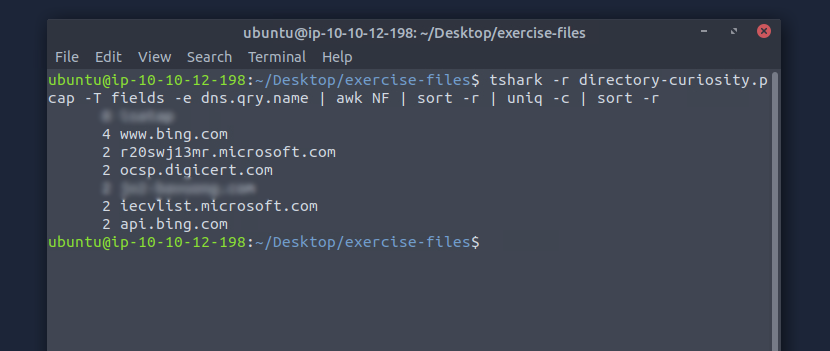
Question 2:
What is the total number of HTTP requests sent to the malicious domain?
What is the total number of HTTP requests sent to the malicious domain?
I figured that the easiest way to answer this question was by getting the ip_address first and then count the number of packets this address received. Which also directly answered the next question.
Finding the number of requests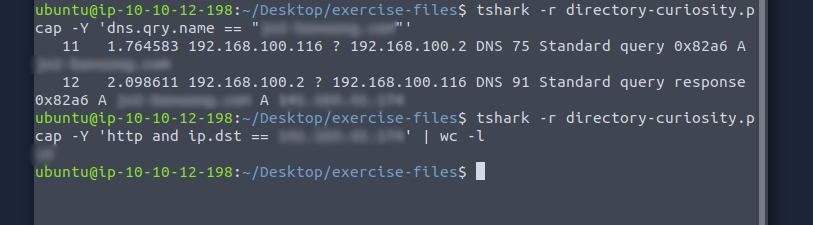
Question 3:
What is the IP address associated with the malicious domain?
What is the IP address associated with the malicious domain?
See question 2.
Question 4:
What is the server info of the suspicious domain?
What is the server info of the suspicious domain?
We can use the ip_address to find this information, and to reduce the amount of output we need to go through, add a frame number. If we first run an http and
ip.src == ip_address
search we can use any frame number with the verbose flag -V added to get the Packet Details. The server info is a long string that describes the server.
Question 5:
Follow the "first TCP stream" in "ASCII". Investigate the output carefully.
What is the number of listed files?
Follow the "first TCP stream" in "ASCII". Investigate the output carefully.
What is the number of listed files?
We learned in the TShark rooms that we can follow a stream by using the pattern follow,protocol,datatype,stream number, if we apply the information asked for in this question we get:
-z follow,tcp,ascii,0 -q
. This returns the contents of TCP Stream 0. We can now search through the contents for the listed files. The files will be listed in the HTML part of the stream.TCP Stream 0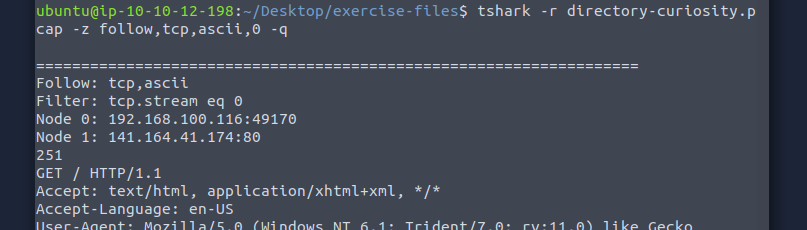
Question 6:
What is the filename of the first file?
What is the filename of the first file?
See the previous question
Question 7:
Export all HTTP traffic objects. What is the name of the downloaded executable file?
Export all HTTP traffic objects. What is the name of the downloaded executable file?
We'll need to consult the TShark documentation for this question as it wasn't covered in the TShark walkthrough room. https://tshark.dev/export/export_regular/
We learn that the
We learn that the
--ex
or --export-objects
takes in a protocol and an output path. We know we're looking for objects in the HTTP traffic and can use foldername to create a new folder with the objects.--ex http,http_obj -q
Export objects
Question 8:
What is the SHA256 value of the malicious file?
What is the SHA256 value of the malicious file?
This is an important one to learn, file hashes are used commonly in cybersecurity to both detect malicious files as well as making sure that a downloaded file is unaltered. We can use the
sha256sum file_path
to create a hash for our file. First we need to find our suspicious file. If you have trouble finding it go back to the files we found earlier and compare the exported objects.The SHA256 hash of the file
Question 9:
Search the SHA256 value of the file on VirtusTotal. What is the "PEiD packer" value?
Search the SHA256 value of the file on VirtusTotal. What is the "PEiD packer" value?
Just like urls and domains we can verify hashes on Virustotal. Using the hash created in the previous task we can run a search on Virustotal.
Virustotal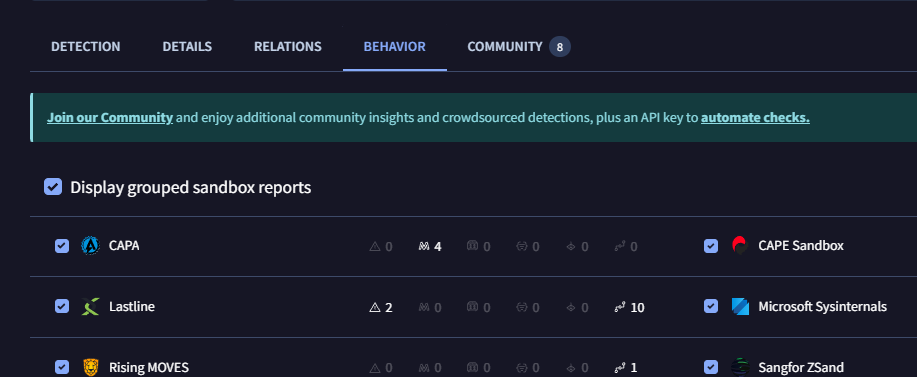
Question 10:
Search the SHA256 value of the file on VirtusTotal. What does the "Lastline Sandbox" flag this as?
Search the SHA256 value of the file on VirtusTotal. What does the "Lastline Sandbox" flag this as?
On the same page but a different tab we can find the type of file that Lastline Sandbox flagged this file as.
Conclusion
Assuming we are a SOC level 1 analyst:
This ticket needs to be escalated as soon as possible. We determined that the user downloaded a file that was flagged as malicious by multiple vendors on Virustotal. The type of file means that if we do not isolate this endpoint our organisation risks a bigger infection than just the initial account.
This ticket needs to be escalated as soon as possible. We determined that the user downloaded a file that was flagged as malicious by multiple vendors on Virustotal. The type of file means that if we do not isolate this endpoint our organisation risks a bigger infection than just the initial account.